Understanding React’s Virtual DOM: The Secret Behind Lightning-Fast UIs
Table of Contents
- How React updates your apps in milliseconds, not seconds
- The Problem: Why DOM Updates Are Slow
- Enter Virtual DOM: React’s Game Changer
- How It Works: 4 Simple Steps
- Real Numbers: The Performance Impact
- The Hidden Superpower: Avoiding Unnecessary Re-renders
- Bonus: Batching Multiple Updates
- See It In Action
- Common Myths Debunked
- Why This Matters Beyond Performance
- The Bottom Line
- Quick Performance Tips
- Want to Learn More?
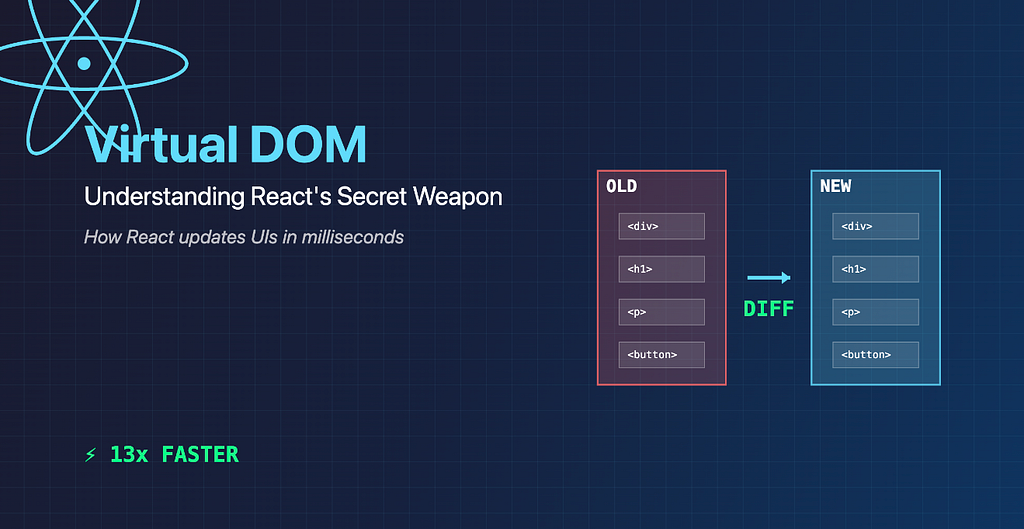
How React updates your apps in milliseconds, not seconds
The Problem: Why DOM Updates Are Slow
Imagine you’re building a social media feed. Every like, comment, or scroll triggers UI updates. In traditional JavaScript, updating the DOM is expensive:
todoList.innerHTML = `
  <li>Buy groceries</li>
  <li>Walk the dog</li>
  <li>Finish project</li>
  <li>Call mom</li>  // Adding just ONE item
`;
What just happened? To add a single item, we destroyed and recreated the entire list. The browser had to:
- Remove 3 existing elements
- Create 4 new elements
- Recalculate layout
- Repaint everything
For Facebook’s news feed with hundreds of posts? Performance nightmare.
Enter Virtual DOM: React’s Game Changer
React asked: “What if we could figure out the minimal changes needed BEFORE touching the real DOM?”
The Virtual DOM is a lightweight JavaScript copy of the real DOM that lives in memory.
The brilliant insight: JavaScript operations are fast. DOM operations are slow. So do all the heavy lifting in JavaScript first!
How It Works: 4 Simple Steps
Step 1: React Creates Two DOMs
When your app loads:
- Real DOM → What you see in the browser
- Virtual DOM → A JavaScript object in memory
{
  type: 'div',
  children: [
    { type: 'h1', children: 'Counter App' },
    { type: 'p', children: 'Count: 0' },
    { type: 'button', children: 'Click' }
  ]
}
Step 2: State Changes
When you click a button:
function Counter() {
  const [count, setCount] = useState(0);

  return (
    <div>
      <h1>Counter App</h1>
      <p>Count: {count}</p>
      <button onClick={() => setCount(count + 1)}>Click</button>
    </div>
  );
}
React creates a NEW Virtual DOM with updated state (count: 1) but doesn’t touch the real DOM yet.
Step 3: The Magic — Diffing
Now React compares the old Virtual DOM with the new one to find exactly what changed. This comparison is called diffing, and it happens entirely in JavaScript memory — super fast!
Here’s what React discovers:
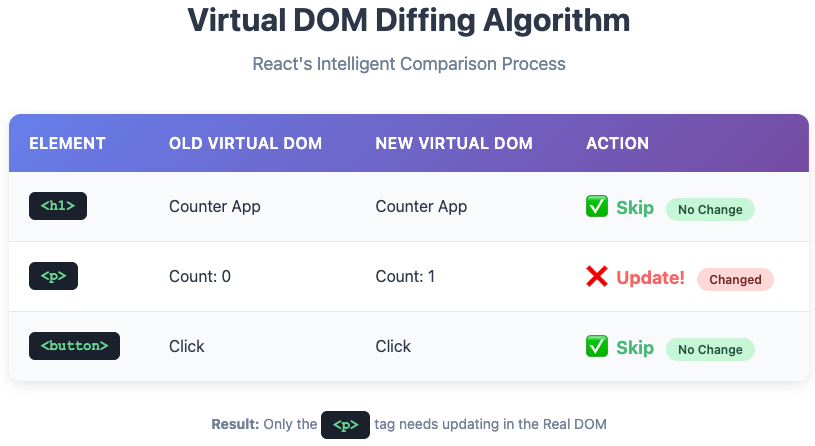
Discovery: Only the <p> tag needs updating!
This comparison happens in milliseconds — it’s all JavaScript, no DOM touching.
Step 4: Minimal Real DOM Update
document.querySelector('p').textContent = 'Count: 1';That’s it. One tiny operation. No destroying, no rebuilding, no unnecessary work. Just change the text content of one element.
The <h1>, <button>, and container <div> are completely untouched.
Real Numbers: The Performance Impact
Let’s see the actual performance difference. Imagine updating a list of 100 items where only 10 actually changed:
Without Virtual DOM (Traditional approach):
- Remove all 100 elements: ~500ms
- Create 100 new elements: ~500ms
- Layout recalculation: ~200ms
- Painting: ~300ms
- Total: ~1500ms ❌
With Virtual DOM (React’s approach):
- Virtual DOM diffing: ~10ms
- Update only 10 changed elements: ~50ms
- Layout recalculation: ~20ms
- Painting: ~30ms
- Total: ~110ms ✅
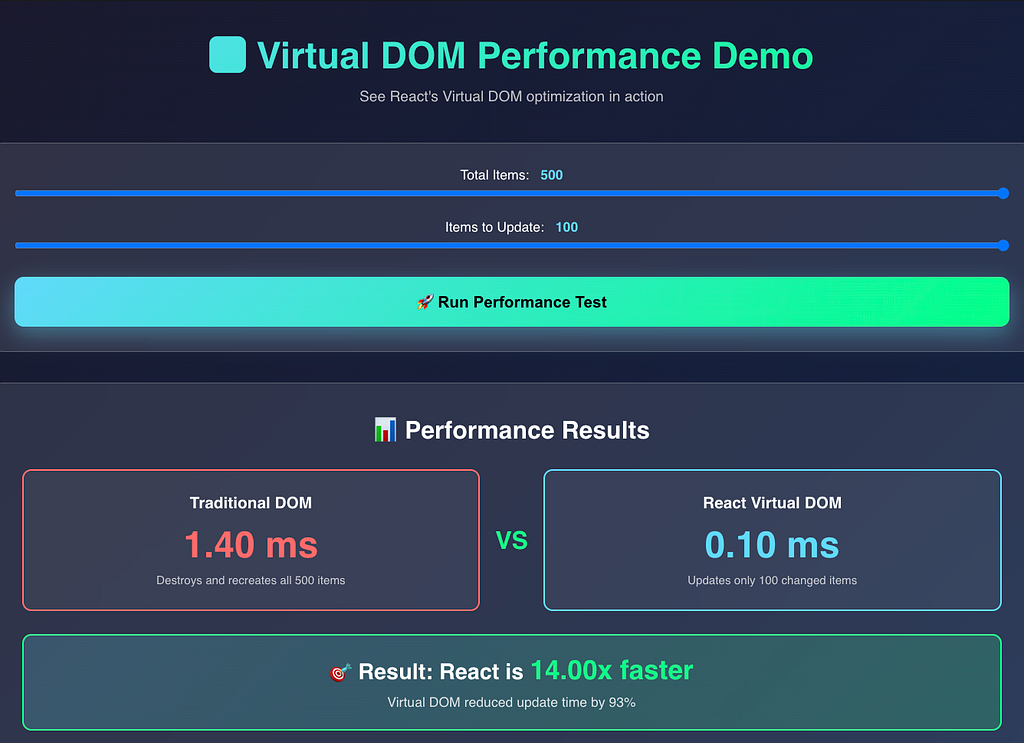
In real applications with thousands of elements, this difference becomes even more dramatic.
The Hidden Superpower: Avoiding Unnecessary Re-renders
Here’s where Virtual DOM truly shines. Consider this dashboard with multiple components:
function Dashboard() {
  const [notifications, setNotifications] = useState(0);

  return (
    <div>
      <Header />
      <Sidebar />
      <NotificationBadge count={notifications} />
      <Footer />
      <ChatWidget />
    </div>
  );
}
When the notifications state changes from 0 to 1:
Traditional JavaScript approach:
Everything would be destroyed and recreated. The Header (which has nothing to do with notifications), the Sidebar, the Footer, the ChatWidget — all re-rendered unnecessarily. Total waste of resources!
React + Virtual DOM approach:
React’s diffing algorithm checks each component:
- Header — Props unchanged → Skip it entirely ✅
- Sidebar — Props unchanged → Skip it entirely ✅
- NotificationBadge — Count prop changed → Update this one! ❌
- Footer — Props unchanged → Skip it entirely ✅
- ChatWidget — Props unchanged → Skip it entirely ✅
Result: Only NotificationBadge updates in the real DOM. The other four components? Completely untouched.
This is huge! Imagine a complex dashboard with 20 widgets. If only one widget’s data changes, React updates just that one widget — not the entire dashboard.
Bonus: Batching Multiple Updates
React doesn’t just use Virtual DOM — it also batches updates together. Watch this:
function handleClick() {
  setCount(count + 1);
  setName('John');
  setEmail('john@example.com');
}
Instead of updating the DOM three separate times, React is smarter:
- Collects all three state changes
- Creates one new Virtual DOM with all changes
- Performs one diff operation
- Makes one batch update to the real DOM
Three state updates become one DOM manipulation. This batching can make your app 3x-10x faster in scenarios with multiple simultaneous updates!
See It In Action
Here’s a practical example you can try yourself:
function ExpensiveComponent() {
  console.log('ExpensiveComponent rendered!');
  return (
    <div style={{ padding: '20px', border: '2px solid blue' }}>
      <h3>I do heavy calculations...</h3>
    </div>
  );
}

function App() {
  const [count, setCount] = useState(0);
  const [text, setText] = useState('');

  return (
    <div>
      <button onClick={() => setCount(count + 1)}>
        Count: {count}
      </button>

      <input
        value={text}
        onChange={(e) => setText(e.target.value)}
        placeholder="Type here..."
      />

      <ExpensiveComponent />
    </div>
  );
}
Try this experiment: Open your browser console and watch what happens:
- Click the button → The console shows ExpensiveComponent does NOT re-render
- Type in the input → Again, ExpensiveComponent does NOT re-render
Why? Because Virtual DOM detected that ExpensiveComponent's props haven't changed, so React completely skips re-rendering it. Even though the parent App component re-rendered, React is smart enough to know that ExpensiveComponent doesn't need to update.
This is the Virtual DOM optimization in action!
Common Myths Debunked
Myth #1: “Virtual DOM makes React fast”
Reality: Virtual DOM doesn’t make React inherently fast. What it does is make updates efficient by minimizing expensive DOM operations. The real speed comes from avoiding unnecessary work, not from raw execution speed.
Myth #2: “Virtual DOM is always faster than direct DOM manipulation”
Reality: For a single, simple update, direct DOM manipulation can actually be faster. Virtual DOM has overhead (creating objects, diffing, etc.).
But real applications aren’t about single updates. They’re about hundreds of components with frequent state changes. That’s where Virtual DOM’s optimization shines.
Myth #3: “React re-renders everything on every state change”
Reality: This is the biggest misconception! When state changes, React creates a new Virtual DOM, compares it with the old one, and only updates what actually changed in the Real DOM. Not everything re-renders — only the necessary parts.
Why This Matters Beyond Performance
Virtual DOM enables an entirely different way of building UIs:
1. Declarative Programming
You describe what the UI should look like, not how to change it:
return <p>Count: {count}</p>;React figures out how to efficiently get from the old state to the new state.
2. Predictable Updates
You don’t manually track which DOM elements to update:
setState({ count: 5 });Just change state, and React handles the rest.
3. Cross-Platform Power
The same Virtual DOM concept powers:
- React DOM (web browsers)
- React Native (iOS/Android apps)
Write the logic once, render anywhere.
4. Better Developer Experience
- No manual DOM tracking
- Easier debugging
- Less bug-prone code
- Simpler mental model
The Bottom Line
Virtual DOM is React’s stroke of genius. Here’s how it works in a nutshell:
- Keeps a JavaScript copy of the DOM in memory (fast)
- Compares changes using a diffing algorithm (fast)
- Updates only what changed in the real DOM (minimal work)
- Batches multiple updates into one operation (even faster)
The result? Your apps feel instant, even with complex UIs containing thousands of elements.
Next time someone asks why React is so popular, you know the answer:
“React doesn’t just update your UI — it updates it intelligently, touching only what needs to change.”
Quick Performance Tips
Want to get the most out of Virtual DOM? Follow these best practices:
✅ Use keys in lists — Helps the diffing algorithm identify which items changed
{items.map(item => <Item key={item.id} data={item} />)}✅ Memoize expensive components — Prevent unnecessary re-renders
const ExpensiveChart = React.memo(function Chart({ data }) {
  return <canvas>...</canvas>;
});
✅ Split large components — Smaller components = faster, more precise diffing
✅ Use React DevTools — Visualize what’s re-rendering and why
Want to Learn More?
- React’s Official Docs: Reconciliation
- Fiber Architecture: How React 16+ took Virtual DOM even further
- Build the demo app above and experiment with the console
Happy coding! 🚀
Working on something similar? Get in touch
Have questions about this article, architecture patterns, or looking for pair programming and engineering consulting? My inbox is always open.
Send me an emailRelated Articles
how 'this' behaves in the call, bind, apply
**a brief intro of this with call, bind and apply**
What Really Happens When You Call setTimeout()?
A Deep Dive from JavaScript to Hardware Every JavaScript developer has used setTimeout. It's one of the first async concepts we learn. But have you ever won...
Confusion will be gone about 'this'
Most confusion about `this` comes from one wrong assumption: that it's decided by where a function is **written**. It isn't. `this` is decided by how the function is **called**.
Table of Contents
- How React updates your apps in milliseconds, not seconds
- The Problem: Why DOM Updates Are Slow
- Enter Virtual DOM: React’s Game Changer
- How It Works: 4 Simple Steps
- Real Numbers: The Performance Impact
- The Hidden Superpower: Avoiding Unnecessary Re-renders
- Bonus: Batching Multiple Updates
- See It In Action
- Common Myths Debunked
- Why This Matters Beyond Performance
- The Bottom Line
- Quick Performance Tips
- Want to Learn More?